A practical way to test the interface
Before using a demonstration, choose a small inspection task: locate the full stake, identify a paid optional button or find the explanation of the round counter. Establish the mode from an explicit label before interpreting the balance. A virtual amount may use a familiar currency symbol without being your deposit. Opening help or viewing an unstarted board can answer the task without completing any round. Keep those observations separate from claims about real payments or personal win rates. Switching later to a paid client calls for a new check of mode, balance and selected price rather than assuming the demo state carried over.
Try the same controls on the device you expect to use. A title that looks comfortable on a desktop may place its information menu behind an extra control on a phone. Before leaving a demo, note the exact game version and any configuration details supplied. Then, if considering a promotion, compare that title with the eligibility shown at Zora Slots Bonus. Choosing a game, understanding its rules and checking bonus compatibility are three separate steps that work best in that order.
Practical application
After leaving a demonstration, check the balance label and stake controls again. Familiar artwork can make the mode change easy to miss. A demonstration result is useful for understanding buttons and rules, but its displayed credits are not your withdrawable account balance and its sequence does not predict paid outcomes.
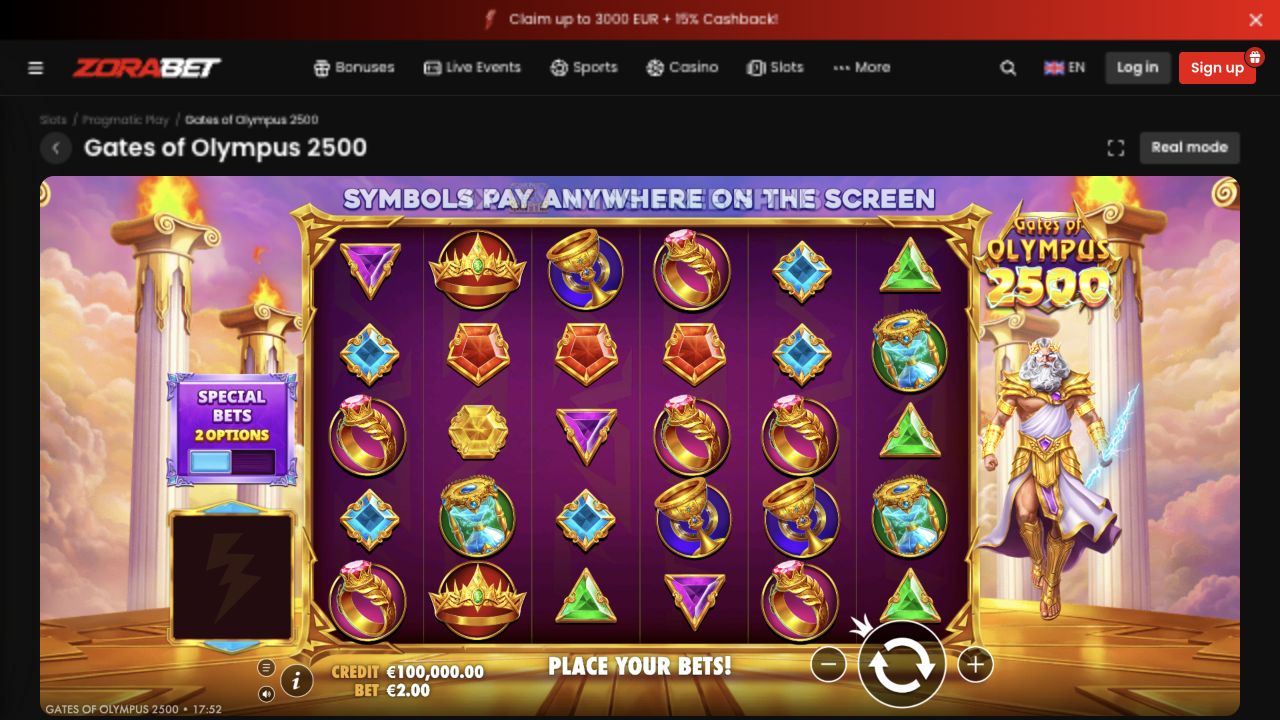
Give a demonstration a defined learning task
A useful demo visit can answer a question in a few deliberate steps: locate the information panel, identify the total stake and see how the game labels a completed round. Choose the question first. Otherwise a demonstration can turn into an unstructured sequence in which a short winning or losing run becomes the main thing remembered.
For example, if the question concerns a line value, change the allowed setting and observe how the total label responds before starting any round. This checks the interface relationship without treating the resulting prize sequence as evidence about future paid play. Note what you learned in words rather than recording only a virtual balance.
Compare information screens across modes
If both modes are accessible, compare the exact title, provider and mode information. Similar artwork does not establish that every setting is identical. Read any displayed mathematical configuration in the relevant help panel, and keep an unresolved field unresolved when the interface does not supply it.
Promotional eligibility belongs to the account offer rather than the demonstration. A feature accessible with virtual credits does not prove that it is permitted with a particular bonus balance. Likewise, the presence of a demo control on a public game card establishes a visible navigation option, not proof that the review team launched a funded session or tested payment handling.
Check controls on the device you actually intend to use
A phone can hide information behind a menu or allow its keyboard to cover the stake summary. Inspect the help, close it and verify that the mode and amount are still visible. Try orientation changes before committing an action so moving controls do not create an accidental selection. A browser shortcut should not be described as a native application merely because it places an icon on a home screen.
Sound, animation speed and presentation settings can also affect how easy it is to follow a round. Evaluate them as usability preferences, not methods for changing the mathematical result. Faster animation does not mean cheaper activity.
Leave the demo with an accurate record
A saved demonstration screenshot should be labelled as such if it shows virtual credits or an illustrative win. It can document the paytable or control layout, but it cannot substantiate a cash payout. The same distinction applies to a video: a realistic interface does not convert its displayed credits into a real transaction.
Before any later paid action, start a fresh check of balance type, selected stake and optional purchases. Do not let familiarity with the demonstration screen replace that check. If the learning task remains unresolved, the appropriate result of the demo is a question to investigate, not a reason to make a deposit to test it.